
How to Take Better Photos of Your Items
Better photos can help people understand your item before making an offer. Learn how to use natural light, choose a clean background, show multiple angles, photograph details and defects, and take clearer listing photos using the phone you already have.
Why good photos matter
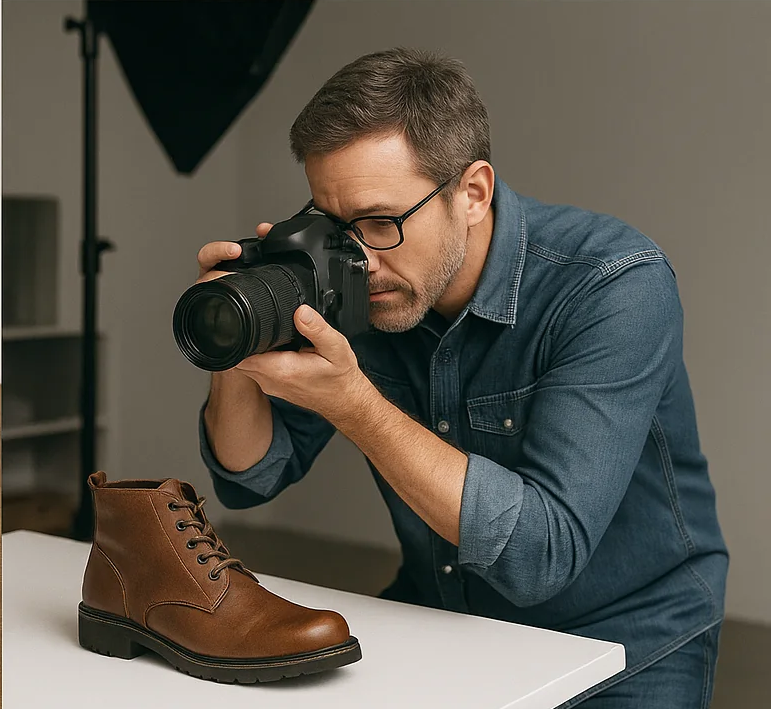
When someone is browsing Exchangify, your photos are often the first thing that catches their attention. Before reading the full description, people naturally look at the images to understand what the item looks like, what condition it is in, and whether it is something they might be interested in.
You do not need an expensive camera or professional photography equipment to take useful listing photos. A modern phone camera is usually more than capable of producing clear images when you pay attention to lighting, composition, and the details you show.
The goal of a listing photo is not to make the item look artificially perfect. The goal is to show the actual item clearly and honestly.
Good photos can help answer questions that words cannot. They can show the color, shape, texture, size, visible wear, scratches, labels, accessories, and overall appearance of the item.
With a few simple habits, you can make your listing photos much more informative.
1. Clean the item before photographing it
Before taking photos, take a few minutes to prepare the item.
Remove dust, fingerprints, crumbs, loose packaging, unnecessary stickers, or anything else that makes the item look harder to evaluate.
For example, a wooden table covered with unrelated objects may be difficult to assess. The same table photographed after being cleared and lightly cleaned will be much easier to understand.
This does not mean you need to make the item look brand new. Normal signs of use should still be visible. The purpose of cleaning is simply to make the item itself easier to see.
Do not hide normal wear
Cleaning an item is different from concealing its condition.
If the item has scratches, stains, faded areas, dents, cracks, or other signs of use, those should remain visible in your listing. A clean item with honest photographs is much more useful than an artificially edited image that hides important details.
2. Use good lighting
Lighting is probably the single most important factor in taking better listing photos.
A well-lit item is easier to understand. Colors are more accurate, small details are more visible, and the overall photograph tends to look clearer.
Use natural light when possible
Natural daylight can work extremely well for listing photos.
Try placing the item near a window or in another bright area. Soft daylight can reveal details without creating the harsh shadows that sometimes occur under a strong lamp.
You do not need direct sunlight. In fact, strong direct sunlight can create very bright highlights and dark shadows. A bright room with indirect daylight is often a better choice.
Avoid photographing against a very bright window
If the light source is directly behind the item, your camera may expose for the bright background and leave the item looking dark.
Instead, try to position the item so that the main light falls toward it rather than directly behind it.
Turn on more lights when necessary
If natural light is not available, use the lights in the room to improve visibility.
Try different positions before taking the final photograph. Moving a lamp to the side of an item can sometimes reveal details more effectively than placing it directly in front.
Avoid mixing several very different light sources when possible, especially if they produce noticeably different colors.
3. Keep the background simple
A simple background helps the item stand out.
You do not need a professional photography backdrop. A clean wall, uncluttered floor, plain table, or tidy room can work perfectly well.
The important thing is that the background does not compete with the item.
Compare:
- Less useful: Item photographed on a cluttered table surrounded by cables, bags, food, and unrelated objects.
- More useful: Item photographed on a clean surface with enough space around it to see the whole object.
Remove distracting objects
Before pressing the shutter button, look around the edges of the frame.
Move away objects that distract from the item, especially personal belongings, random packaging, dirty dishes, piles of clothing, or anything else that makes the photograph harder to understand.
A clean background does not have to look artificial. It simply needs to keep attention on the item being offered.
4. Photograph the entire item first
Your first photograph should usually show the complete item.
This gives another member an immediate overview of what is being offered.
Try to make sure the entire object fits comfortably inside the frame and is not cut off at the edges.
For a chair, show the whole chair.
For a bicycle, show the entire bicycle.
For a piece of furniture, show enough of the item for someone to understand its overall size and shape.
Leave a little space around the item
A small amount of space around the edges generally makes the photo easier to view.
A very tightly cropped image can make it difficult to understand the item's proportions.
You can always crop the photograph later, but it is better to capture the complete object first.
5. Take more than one photo
One photograph is rarely enough to show everything that matters.
Different angles can reveal different parts of the item and help another person understand its condition.
For many listings, a useful set of photos might include:
- An overall front or main view.
- A different angle showing the shape and depth.
- A close-up of an important feature.
- A photo of the label, model number, or other identifying information.
- A photo showing visible wear or defects.
You do not have to take dozens of photographs. Focus on the views that add useful information.
6. Show the important details
Once you have a good overall photo, think about what another member would want to inspect more closely.
Depending on the item, useful detail photos can show:
- buttons and controls,
- logos and labels,
- model numbers,
- connectors and ports,
- materials and textures,
- zippers and fasteners,
- seams and stitching,
- moving parts, or
- other features that are important to the item's function.
Think about what you would want to see if you were considering an item without being able to hold it in your hands.
7. Photograph defects honestly
One of the most useful things you can do in a listing is clearly show imperfections.
Scratches, stains, dents, cracks, chips, faded areas, worn edges, missing buttons, and other defects should not be hidden by camera angles or aggressive editing.
Instead, photograph them clearly and explain them in the description.
For example:
The front edge has a small scratch approximately 3 cm long. It is shown in the third photograph.
This gives another member a realistic understanding of the item's condition.
Why showing defects can help
It may seem that showing imperfections makes a listing less attractive, but transparency can make the listing more useful.
Another member can decide whether the defect matters to them before making an offer. This can reduce misunderstandings and unnecessary exchanges later.
8. Take photos from a natural angle
Try to photograph the item from an angle that makes it easy to understand.
For many objects, taking the photograph roughly at the item's natural viewing height works well.
For example, a chair photographed from approximately seat or standing height can make its shape easier to understand than a very high-angle photograph.
For small objects, moving the camera closer while keeping it level can often produce a clearer view.
Avoid extreme angles
Very unusual angles can make an item look distorted.
Unless the angle itself is important, use straightforward views that represent the object naturally.
9. Keep your phone steady
A small amount of camera movement can make an image look blurry.
Hold the phone firmly with both hands when possible and take a moment to stabilize it before pressing the shutter button.
If the lighting is poor and your phone uses a slower shutter speed, movement can become even more noticeable.
You do not need a tripod for ordinary listing photos. Simply keeping the phone steady can already make a significant difference.
10. Clean your camera lens
This is one of the simplest photography tips and one of the easiest to forget.
Your phone spends a lot of time in your hand, pocket, bag, or on other surfaces. The camera lens can quickly collect fingerprints or dust.
Before taking your photos, wipe the lens gently with a clean, soft cloth.
A dirty lens can create hazy or low-contrast images that make an item look less clear.
11. Check focus before taking the photo
Modern phones usually focus automatically, but it is still worth checking that the item itself is in focus.
Tap the main part of the item on your screen before taking the photograph when necessary.
For example, if you are photographing a label or model number, make sure the camera has focused on the label rather than the background.
12. Use the rear camera when practical
Most phones have a higher-quality rear camera than the front-facing camera.
When possible, use the rear camera for listing photos.
The front camera is designed primarily for selfies and video calls. The rear camera is generally better suited to photographing objects.
13. Use the correct orientation
Think about the shape of the item before deciding whether to use a portrait or landscape photograph.
A tall lamp may work better in portrait orientation.
A wide desk, sofa, or bicycle may work better in landscape orientation.
The most important goal is to make the object fit naturally into the frame and remain easy to understand.
14. Show scale when useful
Photos do not always communicate size accurately.
An object can look large in one photograph and small in another depending on the camera distance and perspective.
If size is important, consider including measurements in your description.
You can also provide a photograph that gives some sense of scale when appropriate.
For example, a small household object photographed next to a familiar everyday object can sometimes help communicate its approximate size.
Do not use scale tricks to exaggerate or minimize the apparent size. The goal is simply to provide useful context.
15. Photograph labels and identifying information
For certain items, a photograph of a label can be extremely useful.
This may include:
- brand name,
- model number,
- size label,
- product specifications,
- serial information when appropriate, or
- care instructions.
For example, a photograph of a clothing size label can complement the written size information in your listing.
For electronics, a clear photograph of the model information can help another member identify the exact product.
Be careful with sensitive information
Before uploading a photo of a label, check whether it contains information that should not be publicly shared.
Be especially careful with documents, shipping labels, personal identification, addresses, account information, or other private details that may accidentally appear in the photograph.
16. Avoid excessive filters
Strong filters can change colors and make an item look very different from reality.
For marketplace listings, accurate color and appearance are more useful than dramatic editing.
Minor adjustments such as cropping, correcting exposure, or improving overall brightness can be reasonable. Avoid edits that make important characteristics of the item difficult to judge.
Accuracy is more important than perfection
A photograph does not need to look like a professional advertisement.
It needs to represent the item honestly.
If the item is dark blue, your editing should not make it look black. If there is visible wear, the editing should not make it disappear.
17. Take the photo before cropping
Take the original photograph with enough space around the object, then crop it afterward if necessary.
This gives you more flexibility to adjust the composition without accidentally cutting off important parts.
Make sure the crop still shows the complete item when the entire item is important to understand.
18. Think about reflections
Reflective objects can be difficult to photograph.
Glass, mirrors, polished metal, screens, and glossy surfaces can reflect lights, windows, cameras, and people.
Try changing your position rather than repeatedly editing the photograph afterward.
Moving slightly to the side or changing the angle can sometimes reduce a distracting reflection significantly.
Photograph screens carefully
When photographing a monitor, phone, television, or other screen, avoid glare and strong reflections when possible.
Make sure the screen content is readable and that important defects such as cracks or scratches are still visible.
19. Photograph clothing properly
Clothing can be difficult to evaluate from a single photograph.
Try to show the complete garment and include enough detail to understand its shape and condition.
Useful photographs can include:
- front view,
- back view,
- close-up of the material,
- size label,
- brand label,
- fasteners such as buttons or zippers, and
- any visible stains, tears, or wear.
If the garment has a particular shape, pattern, or detail that matters, make sure at least one photograph shows it clearly.
20. Photograph furniture with enough space around it
Furniture is easier to understand when there is enough space to see its full shape.
Try to avoid taking a sofa, table, wardrobe, or chair photograph in an extremely cramped space where the edges disappear into the background.
If the furniture can be folded or disassembled, you can mention that in the description and include photographs that show the relevant parts.
21. Photograph electronics while they are turned on when useful
If an electronic item works and its operation can be demonstrated safely, a photograph showing it turned on can provide additional information.
For example, a screen can show that the device powers on, while a photograph of a powered appliance may help communicate its general condition.
A photo does not prove every aspect of functionality, so it should complement rather than replace an honest written description.
22. Avoid misleading perspectives
Camera distance and perspective can significantly change how an object appears.
Taking an extreme close-up with a wide-angle phone lens can make nearby parts of an object look unusually large.
When possible, step back slightly and use a natural perspective rather than placing the phone extremely close to the item.
This can produce a more realistic representation.
23. Take a final set of photos before publishing
Before uploading your photos, look through them carefully.
Remove images that are:
- blurry,
- too dark,
- extremely bright,
- poorly framed,
- duplicated, or
- too similar to provide additional information.
Keep the photographs that each add something useful.
24. A simple photo sequence that works for many listings
If you are not sure which photographs to take, this simple sequence can work well for many types of items.
- Overall view: Show the entire item.
- Second angle: Show another side or perspective.
- Important detail: Show a feature people should notice.
- Identification: Show the brand, model, size, or relevant label.
- Condition: Show scratches, wear, damage, or anything else important.
You may need fewer or more photos depending on the item.
25. Match your photos to your description
Your photographs and written description should tell the same story.
If the description says the item has a scratch, the photographs should not make that scratch impossible to see.
If the description says a charger is included, consider showing it in one of the photographs.
If you mention a special feature, include a photograph that demonstrates it when possible.
Consistency between photos and text gives potential exchange partners a clearer picture of what you are offering.
26. Avoid photographing unnecessary personal details
Take a final look at the background before uploading a photo.
You may accidentally include:
- your home address,
- mail or delivery labels,
- documents,
- computer screens containing private information,
- contact details, or
- other personal information.
Crop or retake the photograph if necessary.
Remember that listing photographs are public content intended to show the item, not your private environment.
27. You do not need professional equipment
It is easy to assume that great product photographs require an expensive camera, special lenses, studio lighting, or complicated editing software.
For an Exchangify listing, that is usually unnecessary.
A phone, clean background, decent lighting, steady hands, and a few thoughtful photographs can be enough.
The most important improvement is usually not buying equipment. It is paying attention to what the photograph communicates.
28. Focus on information, not perfection
Remember that the purpose of listing photos is different from the purpose of advertising photography.
You are not trying to create a magazine cover.
You are trying to help another member answer practical questions:
- What does the item actually look like?
- What condition is it in?
- What size or shape is it?
- What details does it have?
- Are there visible defects?
- What comes with it?
A simple, honest photograph that answers one of these questions can be more valuable than a heavily edited image that simply looks attractive.
Example: turning an average photo into a better listing
Imagine that you are listing a small coffee machine.
Your first photograph shows the coffee machine on a kitchen counter, but the room is dark and several unrelated objects are visible around it.
Before taking another photo, you could:
- Clear the area around the machine.
- Move it closer to a window with soft daylight.
- Clean fingerprints from the outside.
- Take a clear overall photograph.
- Take a second photo from the side.
- Photograph the controls and important features.
- Photograph the model label.
- Photograph any scratches or signs of wear.
- Photograph the included accessories.
The equipment has not changed. The camera has not changed. Only the way the item is presented has changed.
The result is a much more informative listing.
Common photography mistakes to avoid
Taking only one photo
A single photograph rarely shows every important part of an item.
Using extremely dark photos
If people cannot clearly see the item, they may move on to another listing.
Using a cluttered background
Unrelated objects can distract attention from the item you are offering.
Hiding defects
Changing the camera angle or using heavy editing to hide damage makes the listing less informative.
Using only manufacturer images
Official product images may show the original product, but they do not show the condition of your particular item.
Taking blurry photographs
A blurry image makes details difficult to evaluate. Keep the phone steady and make sure the lens is clean.
Cropping too aggressively
Do not cut off important parts of the item just to make the photograph look tighter.
Using exaggerated filters
Strong filters can change colors and hide condition details.
Showing private information
Check the background and labels before uploading your photos.
A quick checklist before uploading your photos
Before publishing your listing, ask yourself:
- Lighting: Is the item bright enough to see clearly?
- Focus: Is the item sharp rather than blurry?
- Background: Is there unnecessary clutter?
- Overall view: Can I see the entire item?
- Angles: Have I shown more than one useful view?
- Details: Have I photographed important features or labels?
- Condition: Are visible defects shown honestly?
- Accessories: Have I shown important included items?
- Accuracy: Do the photographs represent the item realistically?
- Privacy: Have I accidentally included personal information?
Better photos can lead to better conversations
Good listing photos cannot guarantee that someone will make an offer, but they can make it easier for people to understand what you are offering.
Clear images reduce uncertainty. They help potential exchange partners see the item before they ask questions, compare your listing with what they are looking for, and decide whether the exchange is worth discussing.
When the photos and description provide useful information from the beginning, the conversation can start from a much better place.
Final thoughts
You do not need professional photography equipment to take better photos of your Exchangify listings.
Start with good light. Keep the background simple. Show the whole item. Take several useful angles. Photograph important details, labels, accessories, and defects. Keep your phone steady, clean the camera lens, and avoid editing that changes the item's true appearance.
Most importantly, think about the person viewing the listing.
Ask yourself:
"If I were considering this exchange, would these photos give me a clear and honest idea of what I am going to receive?"
If the answer is yes, your photographs are doing their job.
A few extra minutes spent taking thoughtful photos can make your listing easier to understand, more informative, and more useful to the Exchangify community.
You may also like
How to Write a Good Listing That Gets Better Offers
A good listing makes it easier for people to understand what you are offering and decide whether it is right for them. Learn how to write clear titles, useful descriptions, accurate condition details, effective exchange preferences, and better listing photos.

What Items Are Good for Swapping?
Not every item is equally easy to exchange. Discover which types of items tend to work well for swapping, from books and clothing to furniture, electronics, hobby gear, kitchen items, and more, plus tips for choosing items that other people are likely to find useful.

Tips for Negotiating an Exchange
Negotiating an exchange does not have to be difficult. Learn how to make thoughtful offers, understand the other person's preferences, make counteroffers, discuss differences in value, handle multiple offers, and reach an agreement that works for both sides.